The Portable Executable (PE) format is the native executable format for Windows. Every .exe, .dll, .sys, and .scr file follows this specification. Understanding PE headers reveals architecture, capabilities, compilation details, and anomalies -- all without executing the binary.
1. PE Format Structure
+----------------------------------+
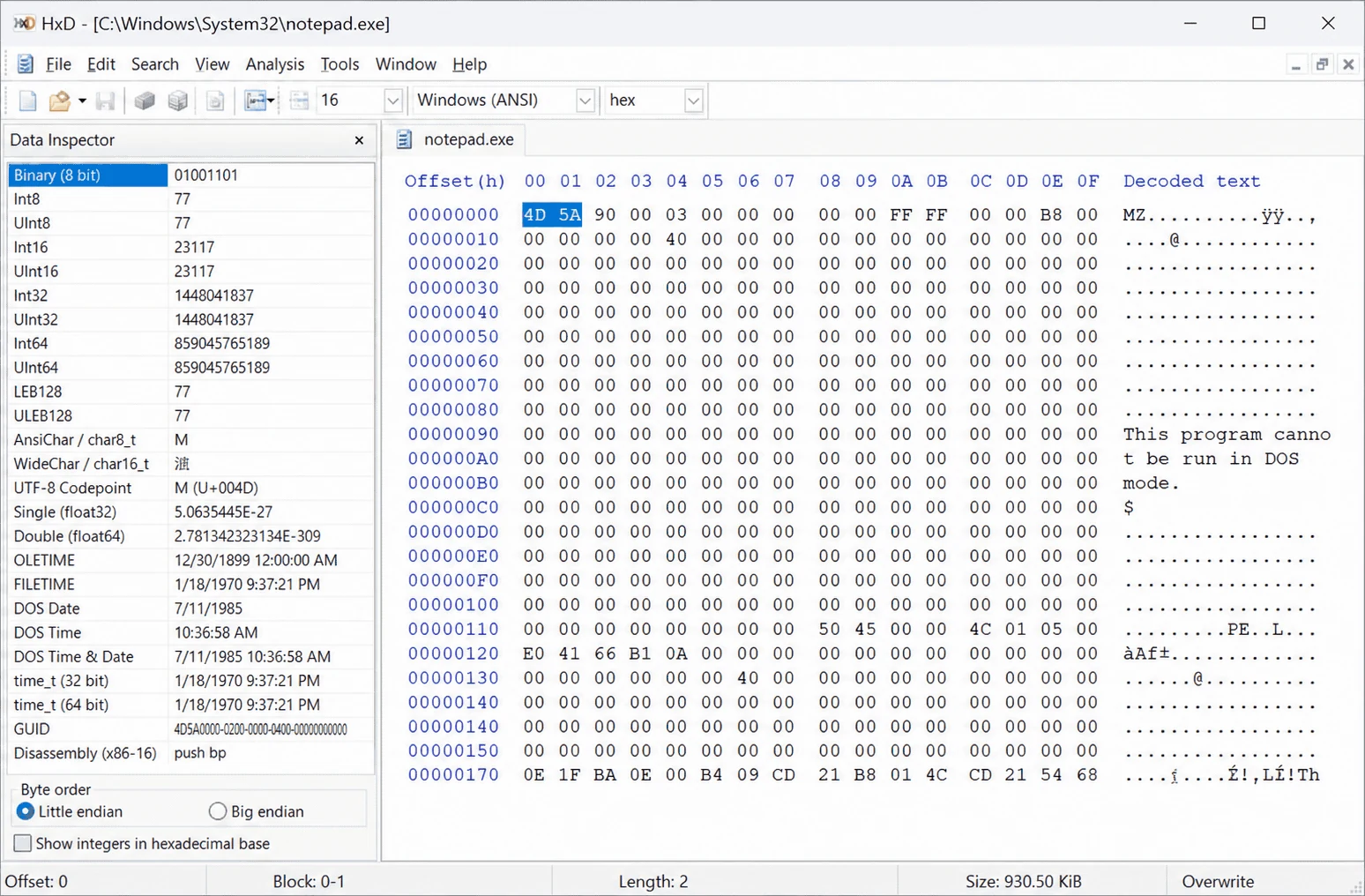
|     DOS Header (64 bytes)        |  "MZ" magic, pointer to PE header
+----------------------------------+
|     DOS Stub                     |  "This program cannot be run..."
+----------------------------------+
|     PE Signature (4 bytes)       |  "PE\0\0" (bytes 50 45 00 00)
+----------------------------------+
|   COFF/File Header (20 bytes)    |  Machine type, section count, timestamp
+----------------------------------+
|   Optional Header (variable)     |  Entry point, image base, subsystem
|     - Standard fields            |
|     - Data Directories           |  Import/export tables, resources
+----------------------------------+
|   Section Headers Table          |  .text, .data, .rdata, .rsrc, .reloc
+----------------------------------+
|   Section Bodies                 |  Actual code and data
+----------------------------------+
Hex editor showing MZ signature at the start of a PE file
2. DOS Header
Field
Offset
Size
Purpose
e_magic
0x00
2 bytes
Must be 0x5A4D ("MZ")
e_lfanew
0x3C
4 bytes
Offset to PE signature
3. COFF File Header
Field
Size
Values of Interest
Machine
2 bytes
0x014C = x86, 0x8664 = x64, 0x01C4 = ARM
NumberOfSections
2 bytes
Normal: 3-7. Very high count suggests packing
TimeDateStamp
4 bytes
Unix timestamp. Often faked by malware authors
Characteristics
2 bytes
IMAGE_FILE_EXECUTABLE_IMAGE, IMAGE_FILE_DLL
Compilation Timestamps
import pefile
from datetime import datetime
pe = pefile.PE("suspicious.exe")
timestamp = pe.FILE_HEADER.TimeDateStamp
dt = datetime.utcfromtimestamp(timestamp)
print(f"Compilation: {dt.strftime('%Y-%m-%d %H:%M:%S')} UTC")
# Red flags:# - Date in the far future (2030+)# - Date of 0 (Jan 1, 1970) -- deliberately zeroed# - Delphi binaries commonly show June 19, 1992 (a linker artifact, not a rule)
4. Optional Header Key Fields
Field
Purpose
Analyst Notes
AddressOfEntryPoint
RVA where execution begins
Points outside .text? Suspect packing
ImageBase
Preferred load address
0x00400000 (EXE), 0x10000000 (DLL)
Subsystem
GUI (2), Console (3), Native (1)
How Windows launches the program
DllCharacteristics
Security features
Check ASLR, DEP/NX, CFG flags
MajorLinkerVersion
Linker version
Identifies compiler toolchain
Understanding RVA vs. VA vs. File Offset
Term
Definition
Example
File Offset
Position on disk
0x00000400
RVA
Offset from ImageBase in memory
0x00001000
VA
RVA + ImageBase
0x00401000
Data Directories
Index
Directory
Why It Matters
1
Import Table
DLLs and APIs used -- critical for capability analysis
2
Resource Table
Embedded icons, configs, additional PE files
5
Base Relocation
Needed for ASLR
6
Debug Directory
PDB path (developer info)
14
CLR Runtime Header
Indicates .NET executable
5. Section Table
Section
Typical Purpose
Suspicious When...
.text
Executable code
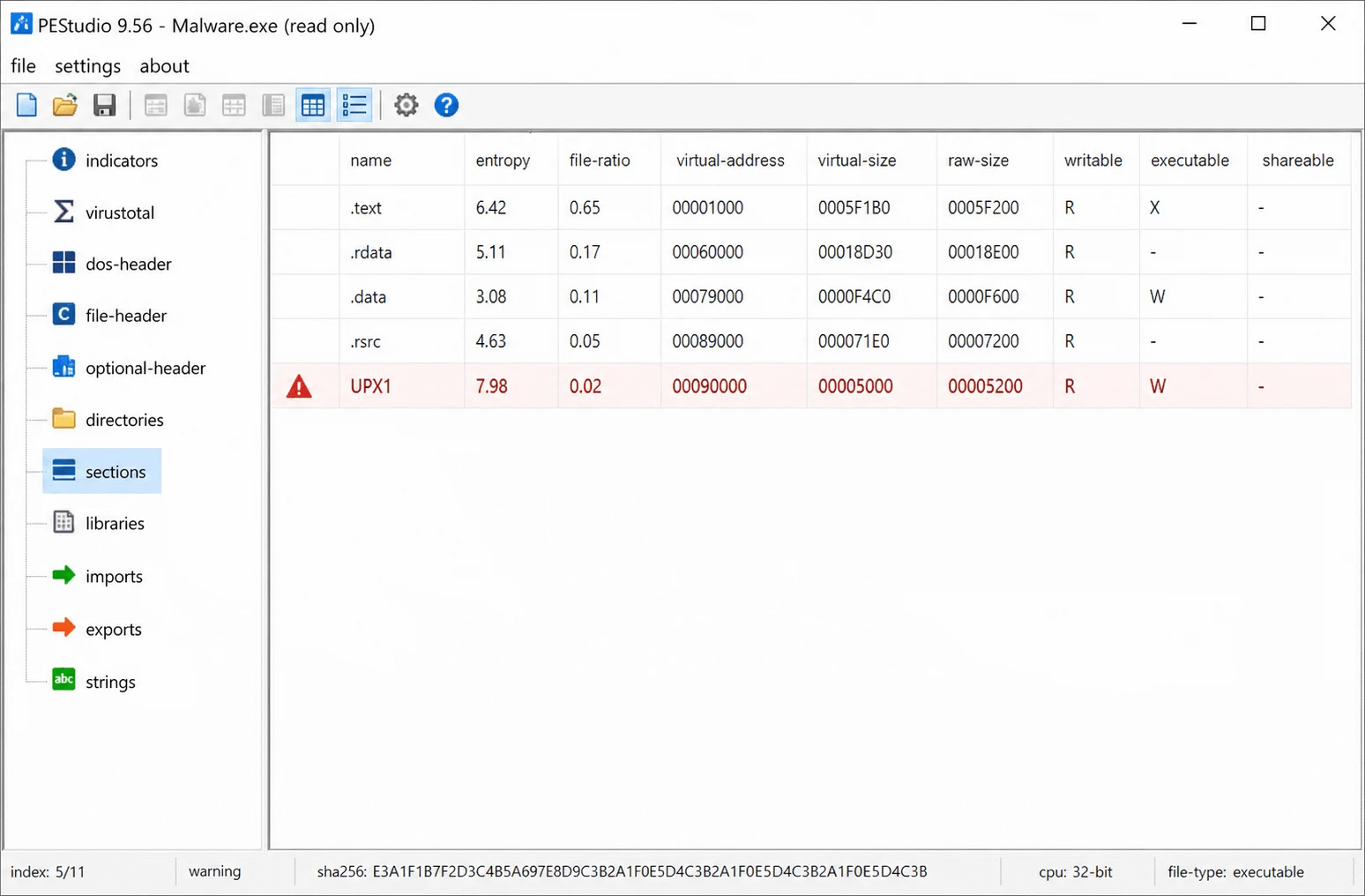
Entropy > 7.0 (packed)
.data
Initialized data
Has EXECUTE flag
.rdata
Read-only data (imports, strings)
Contains URLs/IPs
.rsrc
Resources (icons, dialogs)
Unusually large
.reloc
Base relocations
Missing in a DLL
UPX0/UPX1
UPX packer sections
Packed binary
Random names
Non-standard sections
Custom packer
PEStudio showing PE sections with entropy values and flags