
Packer Detection & Entropy Analysis
Packers are one of the most common obstacles in static malware analysis. They compress, encrypt, or otherwise transform executables to evade signature-based detection and hinder analysis. Detecting packing early saves you from wasting time analyzing meaningless stub code. This lesson covers how packers work, how to detect them using entropy analysis and signature scanning, and what to do when you encounter a packed sample.
1. What Are Packers?
A packer transforms an executable by compressing or encrypting its original code and data, then wrapping it with a small stub program. When the packed file runs, the stub decompresses/decrypts the original code into memory and transfers execution to it.
Original EXE:                    Packed EXE:
+------------------+             +------------------+
| .text (code)     |             | .text (stub)     |  <- Small unpacking code
| .data (data)     |  --pack-->  | .rsrc (packed     |  <- Compressed/encrypted
| .rsrc (resources)|             |   original data) |     original program
| .reloc           |             +------------------+
+------------------+
                                 At runtime: stub unpacks original into memory
Why Malware Uses Packers
- Evade AV signatures -- The original malicious code is hidden inside compressed/encrypted data
- Hinder static analysis -- Strings, imports, and code structure are not visible until unpacked
- Reduce file size -- Compressed payloads are smaller for delivery
- Impede reverse engineering -- Adds an extra layer analysts must peel back
2. Common Packers and Protectors
| Packer/Protector | Type | Key Indicators | Difficulty to Unpack |
|---|---|---|---|
| UPX | Compressor | Section names UPX0/UPX1, UPX! signature | Easy (upx -d) |
| ASPack | Compressor | .aspack/.adata sections, high entropy | Medium |
| MPRESS | Compressor | .MPRESS1/.MPRESS2 sections | Medium |
| Themida/WinLicense | Protector | Many sections, anti-debug, VM detection | Hard |
| VMProtect | Virtualizer | .vmp0/.vmp1 sections, virtualized code | Very Hard |
| Enigma Protector | Protector | .enigma sections, anti-tamper | Hard |
| Obsidium | Protector | Random section names, anti-debug | Hard |
| Custom packers | Varies | Non-standard names, minimal imports | Varies |
Packers vs. Protectors vs. Crypters
| Category | Purpose | Example |
|---|---|---|
| Packer | Compress to reduce size and evade signatures | UPX, ASPack, MPRESS |
| Protector | Anti-debug, anti-VM, code virtualization, license enforcement | Themida, VMProtect |
| Crypter | Encrypt payload, FUD (Fully Undetectable) focus | Custom crypters from underground forums |
3. Entropy Analysis
What Is Shannon Entropy?
Shannon entropy measures the randomness or information density of data, on a scale of 0 to 8 bits per byte:
| Entropy Range | What It Means | Examples |
|---|---|---|
| 0.0 - 1.0 | Very structured, repetitive | Null-filled sections, padding |
| 1.0 - 4.5 | Normal text or structured data | ASCII strings, configuration files |
| 4.5 - 6.5 | Normal compiled code | Typical .text sections, native code |
| 6.5 - 7.5 | Possibly compressed or encoded | Compressed resources, encoded data |
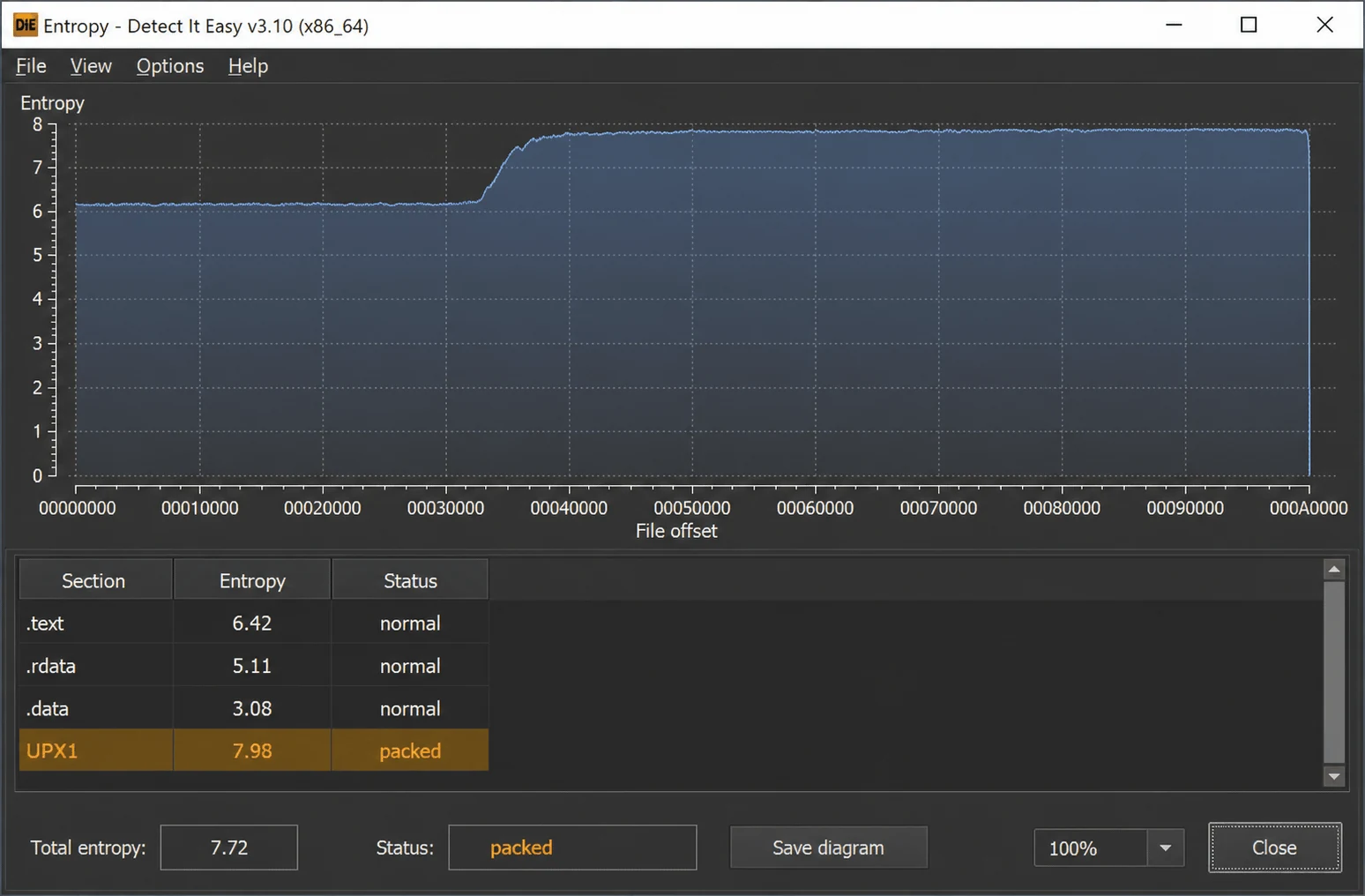
| 7.5 - 8.0 | Almost certainly encrypted or compressed | Packed code, encrypted payloads |
Key insight: Normal executable code has entropy around 5.0-6.5. If a section has entropy above 7.0, it is almost certainly compressed or encrypted -- a strong packing indicator.
Calculating Section Entropy with Python
import pefile
import math

def entropy(data):
    if not data:
        return 0.0
    freq = [0] * 256
    for byte in data:
        freq[byte] += 1
    length = len(data)
    return -sum(
        (f/length) * math.log2(f/length)
        for f in freq if f > 0
    )

pe = pefile.PE("suspicious.exe")
print(f"{'Section':10s} {'Entropy':>8s} {'Raw Size':>10s} {'Virt Size':>10s}  Status")
print("-" * 55)
for section in pe.sections:
    name = section.Name.decode().strip('\x00')
    ent = entropy(section.get_data())
    raw = section.SizeOfRawData
    virt = section.Misc_VirtualSize
    if ent > 7.0:
        status = "PACKED/ENCRYPTED"
    elif ent > 6.5:
        status = "SUSPICIOUS"
    else:
        status = "normal"
    print(f"{name:10s} {ent:8.2f} {raw:10d} {virt:10d}  {status}")
Example output for a normal (unpacked) binary:
Section     Entropy   Raw Size  Virt Size  Status
-------------------------------------------------------
.text         6.35      74752      74590  normal
.rdata        4.75      50176      49823  normal
.data         1.23       4096      10240  normal
.rsrc         3.89       8192       8100  normal
.reloc        5.12       4096       3856  normal
Example output for a UPX-packed binary:
Section     Entropy   Raw Size  Virt Size  Status
-------------------------------------------------------
UPX0          0.00          0     262144  normal       <- Empty on disk, expands in memory
UPX1          7.89      98304     102400  PACKED/ENCRYPTED
.rsrc         3.45       2048       2000  normal
Other Packing Indicators Beyond Entropy
| Indicator | What to Look For | Tool |
|---|---|---|
| Section names | UPX0/UPX1, .aspack, .MPRESS, .vmp0, random names | PEStudio, DiE |
| Virtual size >> Raw size | Section expands dramatically in memory | pefile, PEStudio |
| Few or no imports | Only LoadLibrary + GetProcAddress | PEStudio, pefile |
| Entry point location | Points to unusual section (not .text) | PEStudio, DiE |
| Few readable strings | Most strings are garbage or absent | strings, FLOSS |
| Section flags | Write + Execute on data sections | pefile |
| Small .text, large other | Code section tiny, data section huge | PEStudio |
4. Detection Tools
Detect It Easy (DiE)
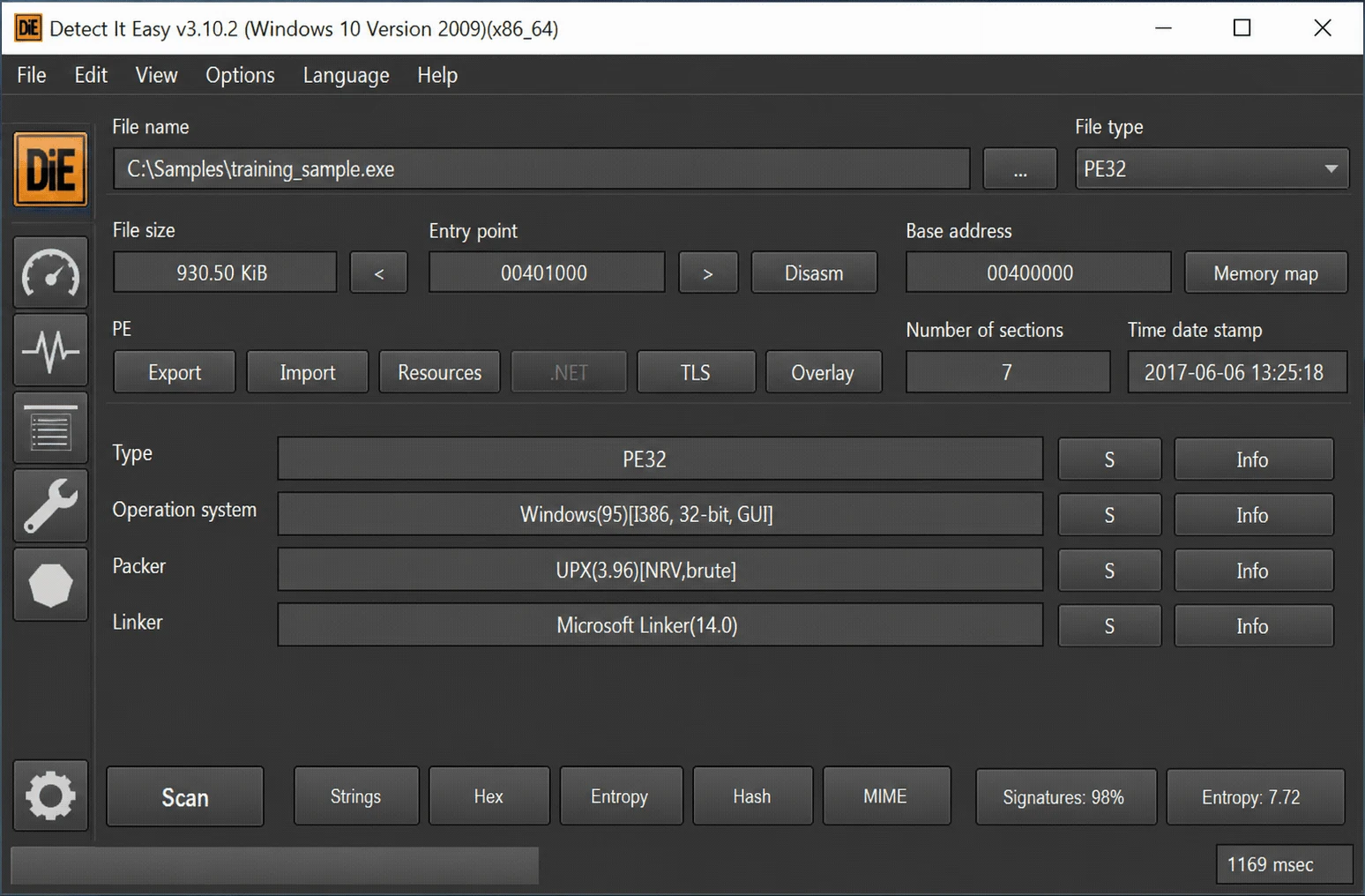
The gold standard for packer identification. Maintains a signature database of 600+ packers, compilers, and protectors:
# CLI on REMnux:
$ diec suspicious.exe
PE32
Packer: UPX (3.96) [NRV2E]
Linker: Microsoft Linker (10.0)

# If not packed:
$ diec clean_sample.exe
PE64
Compiler: Microsoft Visual C/C++ (2019)
Linker: Microsoft Linker (14.29)
Exeinfo PE (Windows)
Similar to DiE but Windows-only. Provides packer hints and "Unpack Info" suggestions. Also has the ability to extract embedded files.
CAPA (Mandiant)
Detects packing-related capabilities automatically:
$ capa suspicious.exe
# Look for rules like:
# - "packed with UPX"
# - "contain anti-disassembly techniques"
# - "reference anti-VM strings"
PEiD (Legacy)
Classic packer identifier. Signature database is outdated but still useful for older samples. The YARA rules community has largely replaced PEiD.
5. Unpacking Strategies
Strategy 1: Automated Unpacking (UPX)
UPX is the most common packer and supports built-in decompression:
# Attempt to unpack
$ upx -d packed_sample.exe -o unpacked_sample.exe
                       Ultimate Packer for eXecutables
  File size         Ratio      Format      Name
  ----------   ------   -----------   -----------
    245760 <-    98304   40.00%   win32/pe   unpacked_sample.exe

# Verify: compare entropy before and after
$ python3 -c "
import pefile, math
def ent(data):
    if not data: return 0
    freq=[0]*256
    for b in data: freq[b]+=1
    l=len(data)
    return -sum((f/l)*math.log2(f/l) for f in freq if f>0)
for f in ['packed_sample.exe','unpacked_sample.exe']:
    pe=pefile.PE(f)
    for s in pe.sections:
        n=s.Name.decode().strip(chr(0))
        print(f'{f}: {n} entropy={ent(s.get_data()):.2f}')
"
Strategy 2: Dynamic Unpacking (Generic)
When automated tools fail, you can unpack at runtime:
- Load in x64dbg and run until the unpacking stub completes
- Set breakpoints on
VirtualProtectorVirtualAlloc-- the unpacker changes memory permissions when writing decoded code - Find the OEP (Original Entry Point) -- the jump from stub to real code
- Dump the process from memory using Scylla or OllyDumpEx
- Fix the IAT (Import Address Table) using Scylla's IAT reconstruction
Strategy 3: Sandbox-Assisted Unpacking
Submit to a sandbox (Any.Run, Hybrid Analysis) and download the memory dumps. Many sandboxes automatically dump unpacked payloads.
6. Packer Detection Workflow
- Run DiE/Exeinfo PE -- check for known packer signatures
- Analyze section entropy -- any section above 7.0?
- Check section names -- UPX, MPRESS, .vmp, random names?
- Examine imports -- only LoadLibrary/GetProcAddress?
- Check entry point -- does it point to .text or elsewhere?
- Compare virtual vs raw sizes -- dramatic expansion?
- Attempt automated unpacking if packer is known (
upx -d) - If automated fails -- proceed to dynamic unpacking or sandbox
Common Pitfall: Not all high-entropy sections indicate packing. Legitimate programs may have compressed resources (icons, images) in .rsrc with high entropy. Focus on the .text (code) section entropy.
MITRE ATT&CK: Packing maps to T1027.002 - Software Packing. Virtually all sophisticated malware families use some form of packing or protection. APT groups regularly use custom packers to evade detection.