
Import Table Analysis
The import directory -- the descriptors and name thunks, which tooling usually shows together as the imports -- names every DLL and API a binary expects to call, and the Import Address Table (IAT) is where the loader writes the resolved addresses at load time. By examining imports, you can quickly understand capabilities -- network communication, file manipulation, process injection, cryptographic operations, and anti-analysis techniques -- all without running a single instruction.
1. How the Import Table Works
When Windows loads a PE file, the loader reads the Import Table to determine which DLLs are needed, loads each DLL, resolves function addresses, and writes them into the IAT. The Import Table is essentially a capability manifest.
2. Suspicious API Reference
Process Manipulation (T1055 - Process Injection)
| API | Purpose | Malware Use |
|---|---|---|
OpenProcess | Open handle to target process | First step of injection |
VirtualAllocEx | Allocate memory in remote process | Space for injected code |
WriteProcessMemory | Write to remote process | Write shellcode/DLL path |
CreateRemoteThread | Execute thread in remote process | Trigger injected code |
NtUnmapViewOfSection | Unmap memory | Process hollowing |
QueueUserAPC | Queue APC to remote thread | APC injection |
File Operations (T1005 only when the data is actually collected)
| API | Malware Use |
|---|---|
CreateFile / WriteFile | Drop payloads, write configs |
DeleteFile | Self-deletion, anti-forensics |
CopyFile / MoveFile | Install to persistent location |
FindFirstFile / FindNextFile | Search for docs to steal/encrypt |
Registry Operations (T1547.001)
| API | Malware Use |
|---|---|
RegSetValueEx | Persistence via Run keys |
RegCreateKeyEx | Create persistence locations |
RegDeleteKey | Remove traces |
Network Operations (T1071)
| API | DLL | Malware Use |
|---|---|---|
InternetOpen / InternetConnect | wininet.dll | HTTP C2 setup |
HttpSendRequest | wininet.dll | Send beacons, exfiltrate |
URLDownloadToFile | urlmon.dll | Direct file download -- very suspicious |
WSAStartup / connect / send | ws2_32.dll | Raw socket communication |
Cryptographic Operations (T1027 / T1486)
| API | Malware Use |
|---|---|
CryptEncrypt / CryptDecrypt | Ransomware, config protection |
CryptDeriveKey | Key generation |
CryptAcquireContext | Initialize crypto |
Anti-Analysis / Evasion (T1497 / T1622)
| API | Malware Use |
|---|---|
IsDebuggerPresent | Anti-debugging |
CheckRemoteDebuggerPresent | Anti-debugging |
GetTickCount / QueryPerformanceCounter | Timing-based anti-debug |
Sleep | Delay execution. Only evasion when the delay is long or checked against a clock -- every program sleeps |
VirtualProtect | Unpack code at runtime |
3. Dynamic Imports: When the Import Table Lies
Sophisticated malware may have a minimal or empty import table and resolve functions at runtime:
LoadLibrary("ws2_32.dll") + GetProcAddress("connect")
If you see only LoadLibrary and GetProcAddress in imports, the malware is hiding its true capabilities.
What to do:
- Note
LoadLibrary/GetProcAddressas a red flag - Use FLOSS or strings to find DLL/API names referenced as strings
- Use dynamic analysis to observe which APIs are actually called
- CAPA can detect dynamic import resolution patterns
4. Tools for Import Analysis
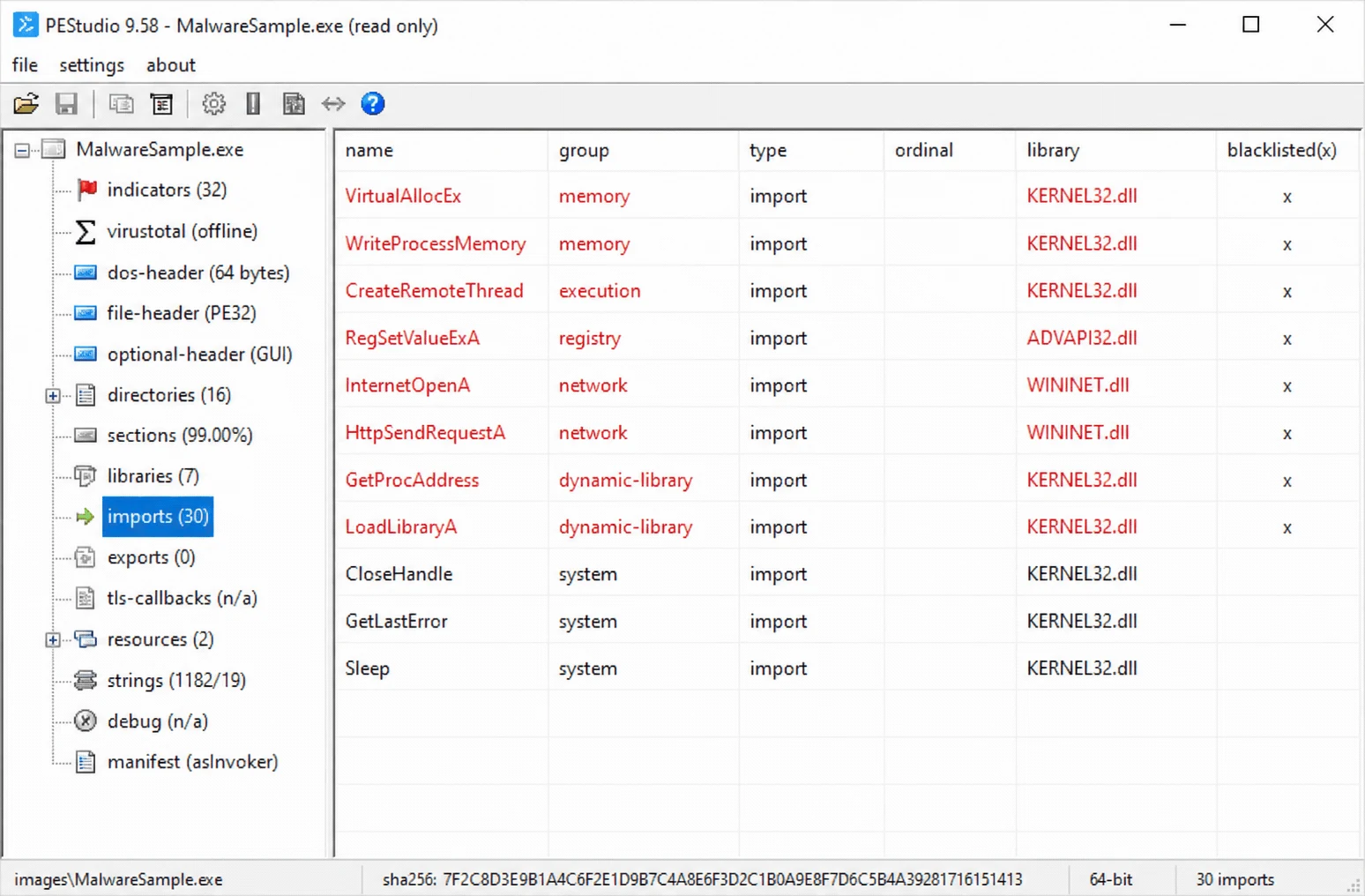
PEStudio
Automatically flags suspicious imports with red indicators, groups by DLL.
pefile (Python)
import pefile
pe = pefile.PE("suspicious.exe")

print("=== Import Table ===")
for entry in pe.DIRECTORY_ENTRY_IMPORT:
    dll_name = entry.dll.decode()
    print(f"\n[{dll_name}]")
    for imp in entry.imports:
        name = imp.name.decode() if imp.name else f"Ordinal {imp.ordinal}"
        print(f"  {name}")

print(f"\nImphash: {pe.get_imphash()}")
CAPA (Mandiant)
$ capa suspicious.exe
# Maps imports to capabilities:
# - "inject code into remote process"
# - "persist via Run registry key"
# - "communicate via HTTP"
Dependency Walker (Windows)
Visual tree of DLL dependencies showing the full chain of imported modules.
5. Import Analysis Workflow
- Open in PEStudio -- scan for flagged imports
- Count imports -- very few suggests packing or dynamic resolution
- Check for LoadLibrary/GetProcAddress -- dynamic resolution indicator
- Categorize imports: process, file, network, registry, crypto, evasion
- Compute imphash -- search VirusTotal for related samples
- Run CAPA -- automated capability mapping
- Form hypotheses -- which ATT&CK techniques does this binary support?
- Plan dynamic analysis -- focus monitoring on suggested behaviors
Common Pitfall: An import being present does not guarantee the function is called. Imports tell you what a binary can do, not what it will do.
MITRE ATT&CK: Import analysis supports identification across nearly all ATT&CK tactics, from Execution (T1106) to Defense Evasion (T1055) to C2 (T1071).