
Analysis Tools Inventory & Verification
A professional malware analysis lab requires dozens of specialized tools spanning static analysis, dynamic analysis, network monitoring, reverse engineering, and automation. This lesson provides a comprehensive inventory of every major tool category, explains what each tool does and when to use it, and gives you verification commands to confirm your lab is ready for action.
Tool Categories Overview
| Category | Purpose | Key Tools |
|---|---|---|
| Static Analysis | Examine files without execution | PEStudio, CAPA, pefile, DIE, FLOSS, YARA, strings, ssdeep, exiftool |
| Dynamic Analysis | Monitor behavior during execution | Procmon, Process Explorer, Regshot, API Monitor, Sysmon, Autoruns, Noriben |
| Network Analysis | Capture and decode network traffic | Wireshark, INetSim, FakeNet-NG, tcpdump, mitmproxy, NetworkMiner |
| Reverse Engineering | Disassemble and decompile code | Ghidra, IDA Free, x64dbg, radare2, Binary Ninja, dnSpy, jadx |
Static Analysis Tools
Static analysis tools examine malware without executing it. They parse file headers, extract strings, identify packers, and detect capabilities.
PEStudio (Windows)
The premier Windows PE analysis tool. Provides a comprehensive view of any executable's properties, flagging suspicious indicators automatically.
What it reveals: Imports, exports, sections, resources, strings, entropy, VirusTotal detection ratio, compilation timestamp, digital signature status.
Verification: Launch PEStudio from the FlareVM desktop
Test: Open any .exe file (e.g., notepad.exe)
Expected: File properties, sections, imports displayed
CAPA (Cross-platform)
Mandiant's open-source tool that automatically identifies capabilities in executable files. It maps findings to the MITRE ATT&CK framework.
# Verify installation:
capa --version
# Expected: capa vX.X.X

# Basic usage:
capa suspicious.exe

# Example output:
# +---------------------------+-------------------------------------------+
# | ATT&CK Tactic             | ATT&CK Technique                         |
# +---------------------------+-------------------------------------------+
# | PERSISTENCE               | T1547.001 Registry Run Keys               |
# | DEFENSE EVASION           | T1140 Deobfuscate/Decode Files           |
# | DISCOVERY                 | T1082 System Information Discovery       |
# | COMMAND AND CONTROL       | T1071.001 Web Protocols                  |
# +---------------------------+-------------------------------------------+

# Output in JSON for automation:
capa -j suspicious.exe > capa_report.json
Detect It Easy / DiE (Cross-platform)
The gold standard for identifying compilers, packers, and protectors. Maintains a signature database of 600+ known packers.
# Command-line usage:
diec suspicious.exe

# Example output:
# PE32
# Compiler: Microsoft Visual C/C++ (2019)
# Packer: UPX (3.96)
# Linker: Microsoft Linker (14.29)
FLOSS (Cross-platform)
FireEye Labs Obfuscated String Solver. Goes far beyond basic string extraction by automatically deobfuscating encoded, stacked, and encrypted strings.
# Verify installation:
floss --version

# Extract all strings including deobfuscated ones:
floss suspicious.exe

# FLOSS finds strings that basic 'strings' misses:
#   - XOR-encoded strings
#   - Stack-constructed strings
#   - Base64-decoded strings
#   - RC4-decrypted strings
YARA (Cross-platform)
The pattern-matching engine used by security teams worldwide to classify and identify malware families.
# Verify installation:
yara --version
# Expected: yara X.X.X

# Scan a file with a YARA rule:
yara -s my_rule.yar suspicious.exe

# Scan with community rules:
yara -r /opt/yara-rules/ suspicious.exe
pefile (Python Library)
Scriptable PE file parser. Essential for automating analysis and extracting structured data from Windows executables.
# Verify installation:
python3 -c "import pefile; print(pefile.__version__)"
Dynamic Analysis Tools
Dynamic analysis tools monitor malware behavior while it executes. They capture file system changes, registry modifications, process activity, and network communications.
Process Monitor / Procmon (Windows)
The single most important dynamic analysis tool. Captures real-time file system, registry, process, thread, and network activity.
Verification: Launch from FlareVM desktop or Sysinternals folder
Location: C:\Tools\Sysinternals\Procmon.exe

Essential pre-analysis filters:
  Process Name -> is -> [malware-name.exe] -> Include
  Operation -> contains -> Write -> Include
  Operation -> contains -> Create -> Include
  Path -> contains -> \Run\ -> Include
  Path -> contains -> \Services\ -> Include

Key shortcut: Ctrl+L (open filter dialog)
Process Explorer (Windows)
Advanced task manager replacement showing real-time process tree, DLL lists, handles, network connections, and VirusTotal integration.
Verification: Launch from FlareVM desktop
Location: C:\Tools\Sysinternals\procexp.exe

Key features for malware analysis:
  - Process tree view (parent-child relationships)
  - Highlight new/destroyed processes
  - DLL view (Ctrl+D) -> see loaded modules per process
  - Handle view (Ctrl+H) -> see open files, registry keys, mutexes
  - Network tab -> active connections per process
  - VirusTotal integration (Options -> VirusTotal.com -> Check)
Regshot (Windows)
Takes "before and after" snapshots of the Windows registry, then compares them to show exactly what the malware changed.
Workflow:
  1. Launch Regshot
  2. Click "1st shot" -> "Shot" (captures baseline)
  3. Execute the malware sample
  4. Wait for malware activity (2-5 minutes)
  5. Click "2nd shot" -> "Shot" (captures modified state)
  6. Click "Compare" -> generates diff report

Output shows:
  - Registry keys added/deleted/modified
  - Values changed with before/after data
Autoruns (Windows)
Shows all programs configured to run at system startup or login. Critical for identifying malware persistence mechanisms.
Verification: Launch from FlareVM Sysinternals folder
Location: C:\Tools\Sysinternals\autoruns.exe

Key tabs for malware analysis:
  - Logon: Run/RunOnce keys, Startup folder
  - Scheduled Tasks: Persistence via task scheduler
  - Services: Malware installed as services
  - Drivers: Rootkit-related entries
  - WMI: WMI event subscription persistence
Network Analysis Tools
Network tools capture and decode all traffic generated by malware, revealing C2 communications, data exfiltration, and download activity.
Wireshark (Cross-platform)
The most widely used network protocol analyzer. Captures packets in real-time and provides deep inspection of hundreds of protocols.
# Verify installation:
wireshark --version
# Expected: Wireshark X.X.X

# Command-line capture (on REMnux):
tshark -i ens33 -w /tmp/capture.pcap

# Essential display filters for malware analysis:
#   dns.qry.name                    -> All DNS queries
#   http.request                    -> All HTTP requests
#   http.request.method == "POST"   -> Exfiltration attempts
#   tcp.port == 443                 -> TLS/SSL traffic
#   ip.src == 10.0.0.100           -> All traffic from analysis VM
tcpdump (Linux/REMnux)
Command-line packet capture tool. Lightweight and perfect for scripted or headless capture sessions.
# Verify installation:
tcpdump --version

# Capture all traffic on the analysis interface:
sudo tcpdump -i ens33 -w /tmp/capture.pcap

# Capture only traffic from the Windows analysis VM:
sudo tcpdump -i ens33 host 10.0.0.100 -w /tmp/malware_traffic.pcap

# Quick live view of DNS queries:
sudo tcpdump -i ens33 port 53 -nn
INetSim (REMnux)
Network service simulator (covered in Lesson 2). Emulates DNS, HTTP, HTTPS, SMTP, FTP, and other services so malware behaves as if it has internet access.
# Start with default configuration:
sudo inetsim

# Configuration file: /etc/inetsim/inetsim.conf
# Log files: /var/log/inetsim/service.log
Reverse Engineering Tools
Reverse engineering tools allow you to disassemble and decompile malware to understand its code-level behavior. These are used in advanced analysis phases.
Ghidra (Cross-platform)
The NSA's open-source reverse engineering framework. Provides disassembly, decompilation, and scripting capabilities.
# Launch Ghidra:
/opt/ghidra/ghidraRun

# Key features:
#   - Auto-analysis identifies functions, strings, cross-references
#   - Decompiler produces C-like pseudocode
#   - Scripting via Java or Python (Jython)
#   - Collaboration server for team analysis
x64dbg (Windows)
The community-standard Windows debugger for malware analysis. Supports both 32-bit (x32dbg) and 64-bit (x64dbg) executables.
Location: C:\Tools\x64dbg\
Launch x32dbg.exe for 32-bit samples
Launch x64dbg.exe for 64-bit samples

Essential shortcuts:
  F9       -> Run
  F2       -> Set breakpoint
  F7       -> Step into
  F8       -> Step over
  Ctrl+G   -> Go to address
  Alt+B    -> Breakpoint list
radare2 / rizin (Linux/REMnux)
Command-line reverse engineering framework. Extremely powerful for scripted analysis and quick disassembly.
# Verify installation:
r2 -v
# Expected: radare2 X.X.X

# Quick analysis:
r2 -A suspicious.exe    # Open with auto-analysis

# Inside r2:
# afl          -> List all functions
# pdf @ main   -> Print disassembly of main
# iz           -> List strings
# ii           -> List imports
Complete Tool Verification Checklist
Run these commands to verify your lab is ready.
REMnux Verification
# Core analysis tools:
python3 --version          # Python 3.x
yara --version             # YARA rule engine
ssdeep --version           # Fuzzy hashing
exiftool -ver              # Metadata extraction

# Network tools:
wireshark --version 2>&1 | head -1
tshark --version 2>&1 | head -1
tcpdump --version 2>&1 | head -1

# Reverse engineering:
r2 -v 2>&1 | head -1

# Verify Python libraries:
python3 -c "import pefile; print('pefile OK')"
python3 -c "import yara; print('yara-python OK')"
python3 -c "import hashlib; print('hashlib OK')"
python3 -c "import magic; print('python-magic OK')"
Windows REM Workstation Verification
# Check Sysinternals tools:
Test-Path "C:\Tools\Sysinternals\Procmon.exe"
Test-Path "C:\Tools\Sysinternals\procexp.exe"
Test-Path "C:\Tools\Sysinternals\autoruns.exe"

# Check analysis tools:
Test-Path "C:\Tools\pestudio\pestudio.exe"
Test-Path "C:\Tools\x64dbg\x32\x32dbg.exe"
Test-Path "C:\Tools\x64dbg\x64\x64dbg.exe"

# Verify CAPA and FLOSS:
capa --version
floss --version

# Verify network isolation:
Test-NetConnection 8.8.8.8 -Port 53 -WarningAction SilentlyContinue |
  Select-Object TcpTestSucceeded
# Expected: TcpTestSucceeded = False
Quick Reference: Tool Selection by Task
| Analysis Task | Primary Tool | Alternatives |
|---|---|---|
| File type identification | file, DIE | PEStudio, exiftool |
| Hash computation | sha256sum, md5sum | PEStudio, HashMyFiles |
| String extraction | FLOSS | strings, BinText |
| PE header analysis | PEStudio | pefile, CFF Explorer |
| Packer detection | DIE | PEiD, CAPA |
| Capability detection | CAPA | Manual import analysis |
| Process monitoring | Procmon | Process Explorer, API Monitor |
| Registry changes | Regshot | Procmon (filter for RegSetValue) |
| Persistence detection | Autoruns | Procmon, manual check |
| Network capture | Wireshark | tcpdump, NetworkMiner |
| Service simulation | INetSim | FakeNet-NG |
| Disassembly | Ghidra | IDA Free, radare2 |
| Debugging | x64dbg | WinDbg, OllyDbg |
| Office macro analysis | olevba | oletools suite |
| PDF analysis | pdfparser | pdf-parser, peepdf |
| YARA scanning | yara | YARA-GUI, Thor Lite |
| Sandbox submission | VirusTotal | Any.Run, Hybrid Analysis |
Online Resources & Intelligence Platforms
Beyond your local tools, these online platforms provide critical context for your analysis:
| Platform | URL | Purpose |
|---|---|---|
| VirusTotal | virustotal.com | Multi-AV scanning, behavioral reports |
| MalwareBazaar | bazaar.abuse.ch | Community malware repository |
| Any.Run | app.any.run | Interactive online sandbox |
| Hybrid Analysis | hybrid-analysis.com | Automated sandbox reports |
| MITRE ATT&CK | attack.mitre.org | Adversary technique framework |
| AlienVault OTX | otx.alienvault.com | Threat intelligence sharing |
| Shodan | shodan.io | Internet-facing device search |
| URLhaus | urlhaus.abuse.ch | Malicious URL tracking |
| ThreatFox | threatfox.abuse.ch | IOC sharing platform |
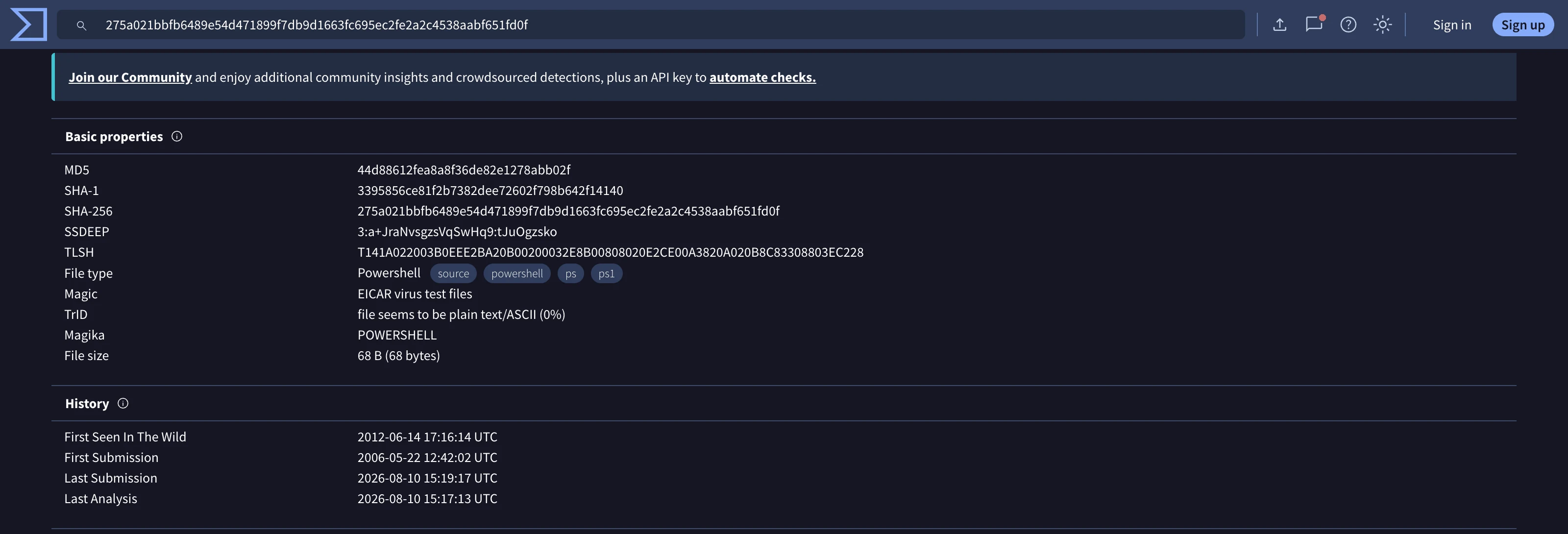
Pro Tip: Always search the hash on VirusTotal before spending time on manual analysis. If the sample is well-known, you can build on existing community analysis rather than starting from scratch. This is the base of the analysis pyramid -- the easiest way to begin learning about a suspicious file.
Next Steps
With your tools verified and your lab architecture understood, you are ready to begin analyzing malware samples. The workflow you will follow throughout this course:
- TRIAGE -- Hash lookup, AV detection, file type ID
- STATIC -- Strings, PE headers, imports, CAPA capabilities
- DYNAMIC -- Execute in VM, monitor with Procmon/Wireshark
- DEEP -- Disassemble in Ghidra, debug in x64dbg
- REPORT -- IOCs, ATT&CK mapping, analyst notes
Each subsequent module will teach you the skills for one or more of these phases. Keep your lab clean, your snapshots current, and your documentation thorough.